
 Supercharge your Elementor Page Builder with Highly customizable Essential Classy Addons For Elementor to build websites in less time with no coding required. Both Elementor and Essential Classy Addons For Elementor plugins take your WordPress website to the next level.
Great Support and Helpful Community
Interactive, Stunning, & Customizable Design
150+ Crafted Widgets
5Essential Classy Addons For Elementor are designed with high coding standards and a modular architecture to make your websites light and quick.
5+ Dynamic Fields
You can get ACF, CFS, JetEngine, Metabox, PODs, Toolset and WCK in Elementor Editor.
Exclusive and Powerful
Additionaly, You can use Link, Glassmorphism, Display Condition, Box Shadow, Text Shadow, Drop Shadow and Equal Height in any Widget or Section/Container
Getting Started
Essential Classy Addons for Elementor
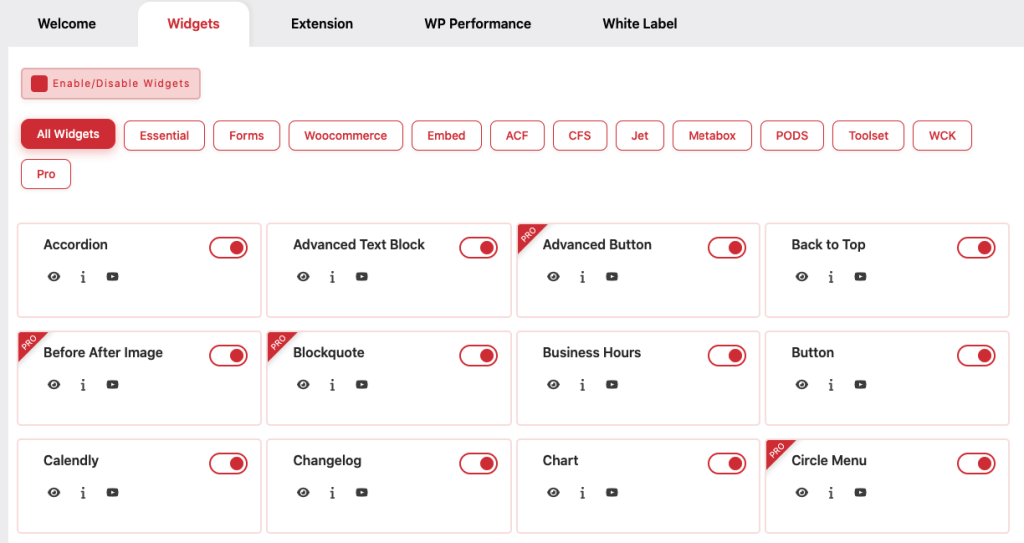
- Go to your WordPress dashboard, navigate to Plugins > Add New, and search for “Essential Classy Addons For Elementor”. Click Install Now and then Activate the plugin.
- After activation, open the Essential Classy tab in your WordPress dashboard to manage all plugin features in one place.
- From the Widgets Panel inside the Essential Classy dashboard, you can easily activate or deactivate specific Elementor widgets to keep your site fast and organized.
- Head to the Extensions Panel to toggle useful design and functionality extensions that enhance your Elementor experience.
- Use the WP Performance Panel to enable smart performance settings that help your WordPress site load faster and rank better in search engines.
- Build beautiful, responsive websites using advanced widgets and tools from Essential Classy Addons.
- Block Author Enumeration
- Clickjacking Protection
- Cross-Origin Embedder Policy (COEP)
- Cross-Origin Opener Policy (COOP)
- Cross-Origin Resource Policy (CORP)
- Cross-Site Scripting (XSS) Protection
- Custom Login Path
- Disable File Editor
- Disable REST API for Non-Logged-in Users
- Global Privacy Control (GPC)
- HTTPS Strict Transport Security (HSTS)
- MIME Sniffing Protection
- Permissions Policy (Feature Policy)
- Referrer Policy - No Referrer
- Referrer Policy - Strict Mode HTTP Only
- Remove X-Powered-By Header
- Server Signature Masking
- Session Cookie
- X-DNS-Prefetch-Control
White Label Branding
- Free Plugin Name
- Free Plugin Description
- Free Plugin Developer / Agency
- Free Plugin Website URL
- Pro Plugin Name
- Pro Plugin Description
- Pro Plugin Developer / Agency
- Pro Plugin Website URL
- Plugin Image / Logo

FAQ
To install the Essential Classy Addons For Elementor, follow the steps below:
From your WordPress dashboard -> Go to Plugins -> Click on ‘Add new’ and In the Search field, enter Essential Classy Addons For Elementor.
Press install -> After installation, click Activate.